 Skip to content
A succession survey gathers information related to the succession pipeline. HR can initiate a survey and involve participants to make the succession planning process more meaningful.
To initiate a succession survey, you need to:
● Login to the system as an HR manager.
● Go to the Roles and features menu  and click on the Succession Planning link. The Succession pipeline page appears.
● Click Initiate succession pipeline survey link to initiate the succession survey.

● Provide a unique survey name.
● Input a date using the Calendar control in the Specify the date by which the survey is to be completed field.
● Select the participants for the survey by typing their names in the Select employees textbox. Click on the  sign after each employee’s name to add the person to the list of surveyors. You can also use the Advanced search icon to search for employees.
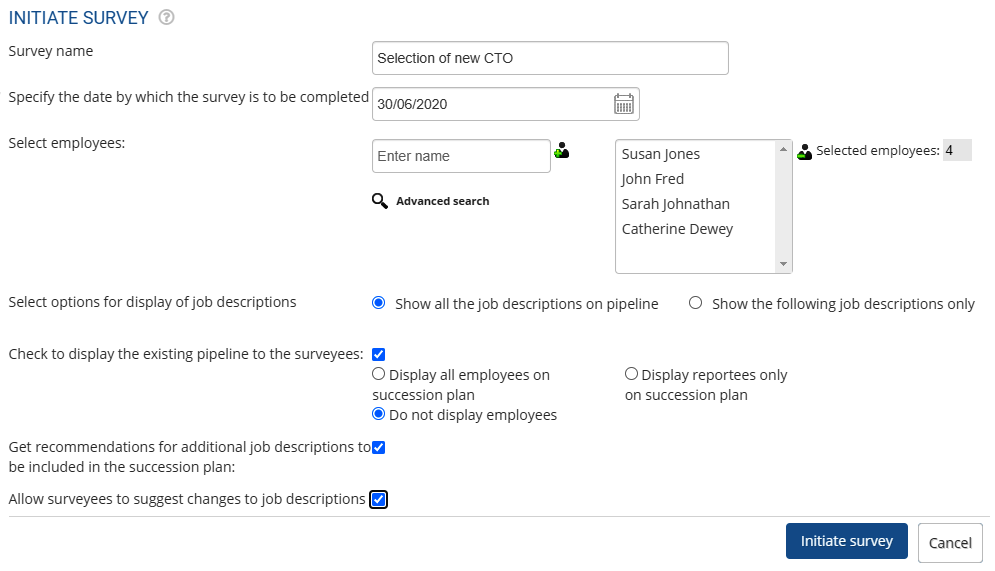
● You can either show all the job descriptions available on the succession pipeline or can restrict the view of job descriptions by selecting the appropriate radio button for Select options for display of job descriptions field.
● Select the checkbox if you want to display the existing pipeline to the survey participants.
● Select the Get recommendations for additional job descriptions to be included in the succession plan checkbox, if you want to allow the surveyors to add new job descriptions to the survey, you can select the appropriate option.
● Select the Allow surveyees to suggest changes to job descriptions checkbox, if you allow changes to job descriptions from the surveyors.
● Click the Initiate succession survey button. A message regarding the survey is sent successfully to the selected employees. And the survey is initiated.
Learn more about Empxtrack Succession Planning
Suggested Links





