 Skip to content
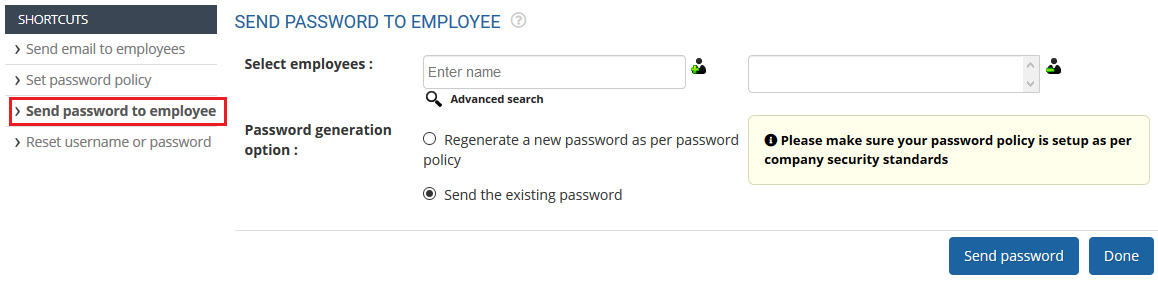
Empxtrack allows HR to regenerate and send passwords to employees via email. Send Password to Employees functionality is used when multiple employees are added (or the password policy is updated) and employees want to access Empxtrack portal.
Note: Empxtrack provides two-factor authentication to prevent data breaches and avoid security risks.
How Employees Can Access Empxtrack Application
● Log in to the system as HR Admin/HR Manager.
● Click on Product configurations. In the Employee management section, click on Employee communication.
● Click Send password to employee and select the employee(s) to whom you want to send the passwords from Select Employees field.
To learn steps to send email, visit the help page Send Email to Employees.
Suggested Links
- Setup Password Policy
- Forget Password
- Reset Password
- Setup, View and Edit Email Templates
- Navigation in Empxtrack
- Multiple Upgrade Options in Empxtrack
- Setup Global Groups
- Setup Access Controls
- Manage Workflows
- Setup Skills and Competencies
- Setup Company Information
- Time Settings
- Upload Employee Data
- Upload Reporting Relationship Data
- Setup HR Admin
- Setup Roles
- Masquerade as another employee
- File Validation Utility
- Open CSV File
- Save CSV File
- Advanced Search





