 Skip to content
Empxtrack allows an HR manager to change the workflow state of an appraisal plan. Once the appraisal is in process, HR can change appraisal state if required. Appraisal state is changed if the current appraisal needs to be rejected due to some reason and a new appraisal form needs to be created for an employee.
Note: The steps mentioned below are of Empxtrack Enterprise product.
To change the state of the appraisal, you need to:
● Log into the system as HR Manager/ HR Admin.
● On the Homepage, click on the Performance tab. A new page appears. Now, under Appraisals click on View all appraisals.
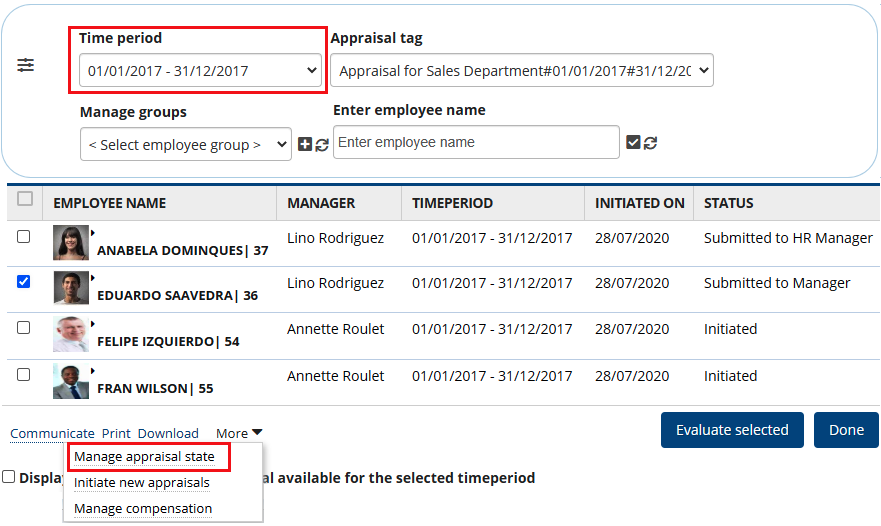
● Select the Timeperiod of the appraisal plan for which you want to change state. The list of employees appear whose appraisal is in process. It displays the current appraisal status for each employee. You can modify the appraisal state.
● Select the checkbox corresponding to the name of the employee(s) whose workflow state you want to change. Here we have selected Eduardo Saavedra and the state will be changed for the selected employee.
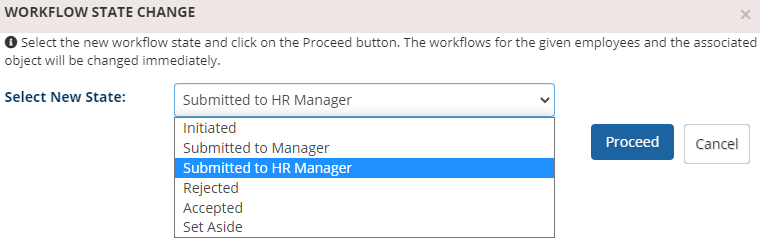
● Click Manage appraisal state. A dialog box appears. You can select the new state from the Select New State dropdown.
The available options are:
- Initiated: If you select this option, then the employee can edit the appraisal form already created.
- Submitted to Manager: If you select this option then the appraisal form would be submitted to the manager.
- Submitted to HR Manager: If you select this option, then the appraisal form would be submitted to the HR Manager.
- Rejected: If you select this option, then the appraisal form is rejected by the employee.
- Accepted: If you select this option, then the appraisal form is accepted by the employee and signed off.
- Set Aside: If you select this option then the appraisal form would be set aside, and a new appraisal form can be recreated.
● Click Proceed button.
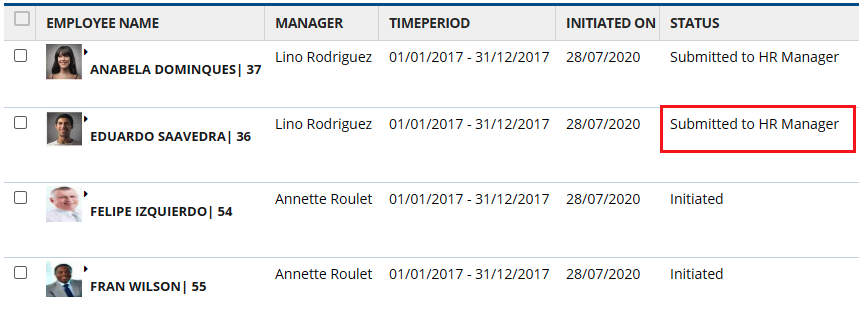
● A confirmation message appears on the screen, click OK button. The new workflow state for the selected employee is successfully.
Learn more about Empxtrack Performance Appraisal
Suggested Links
- Setup Performance Appraisal Plans
- Initiate Appraisal
- Configure Performance Potential Settings
- Appraisal-Employee Access
- Manage Team Appraisal – Filter Records
- Print Appraisal
- Manager Appraisal Dashboard
- Create a new Rating Scale





