 Skip to content
Empxtrack allows to setup performance appraisal plans and runs multiple plans with different groups of employees, forms, score calculations, time periods and workflows. The creation of multiple appraisal plans for different employee groups helps in meeting company specific needs.
A common appraisal plan is not applicable to all employees. The junior level employees cannot be evaluated on the same attributes as senior executives of a company. For example, the probationers may have monthly or half-yearly appraisals, but a senior executive of a company may have only an annual appraisal.
To setup performance appraisal plans, you need to:
● Log into the system as HR Manager/ HR Admin.
● Click on the Product configurations. In the Performance Management section, click on the Appraisal plans link.
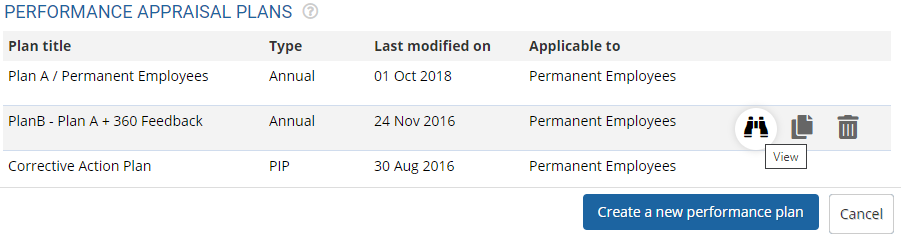
● Click on the Create a new performance plan to set up a new appraisal plan.
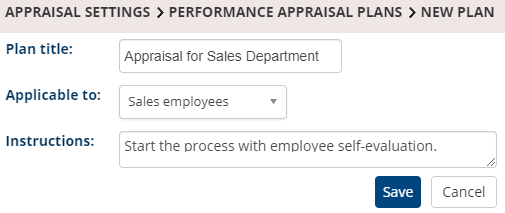
● Provide name of the appraisal plan and and select the group to whom this appraisal plan is applicable to. The Applicable to dropdown displays all the global groups available in the system. To do that, click on Configure a group and follow the steps.
● Provide the description of the plan in the Instructions field.
● Click on Save. The new appraisal plan is successfully created and a message suggesting the same appears.
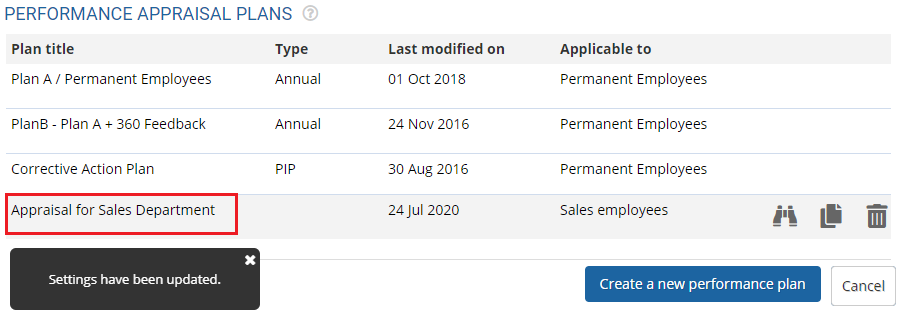
● Once the new performance appraisal plan is created, you can add multiple appraisal forms and configure settings as per your company needs.
Learn more about Empxtrack Performance Appraisal
To get more information on configuration of an appraisal plan, click on the below links:
- Setup Performance Appraisal Timelines and Notifications
- Select Performance Appraisal Forms and Assign Weights
- Setup Visibility Rules for the Appraisal
- Configure Performance Appraisal Forms
Suggested Links





