 Skip to content
This help page displays steps to Setup Policy Documents and Quick Links. The Quick Links are added in the application that makes the documents and links accessible for employees.
Note: The steps mentioned below are of Empxtrack Enterprise product.
Watch a video on how to configure quick links and documents
To Setup Policy Documents and Quick Links, follow the steps:
● Log into the system as an HR manager.
● Click on Product configurations. In the Employee Portal Setup, click on the Company policy documents. A new page appears that displays the quick links and documents already added to the system.

● Click Add document or link.
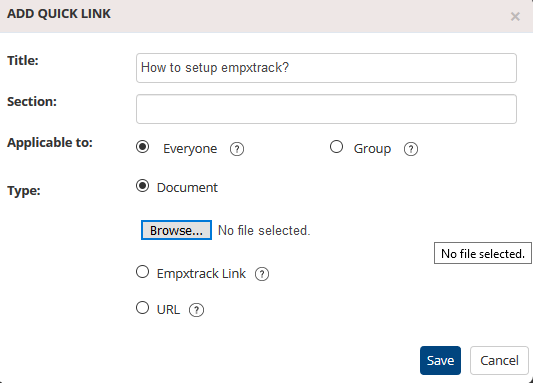
● Provide the name of the document/link/URL in the Title field. Fill in the type of information you are sharing in the Section field.
● Select Everyone from the Applicable to field if you want to share the document with everybody else, select Group if you want to share the document with a selected group of people. If you select the Group option, then you have to select a specific group from the dropdown.
● Select the type of quick link you want to share from the Type field. Click Save.
● The link you created has been successfully created, and a message confirming the same appears.

● Select the checkbox labeled “Force users to accept new policy documents” and then add the new company policy documents or update the existing ones.
To ensure all newly and updated policy documents are read and accepted by your employees, enable this functionality in Empxtrack.
Learn more about Empxtrack Self Service Portal
Suggested Links





