 Skip to content
Empxtrack allows editing of current contact details, permanent address and emergency details of an employee.
Note: The steps mentioned below are of Empxtrack Enterprise product.
To edit the Address Details, you need to:
● Log into the system as an Employee/ Manager/ HR Manager. First follow the path given on the Edit employee details page to login to the system as a specific user role and open the employee profile page.
Note: Icon based menu is available only in Empxtrack Enterprise product.
Modify Current or Permanent Address
● Click on the Contact Details tab under Profile sectionto edit the current address details. Click Edit icon.
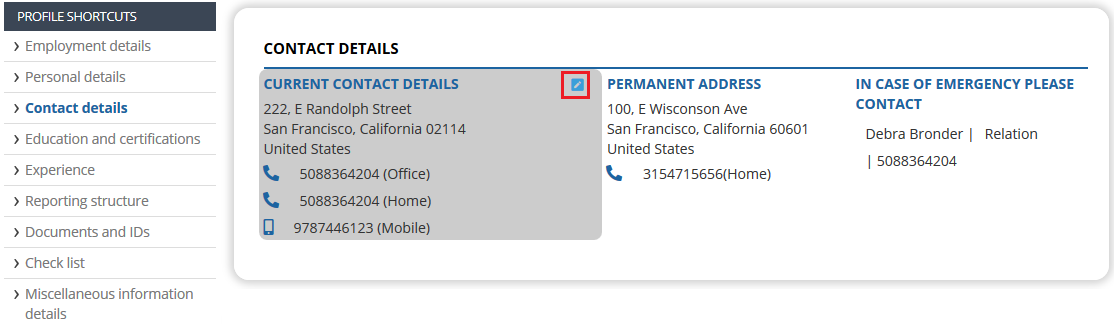
● The Current Address > Modify window appears
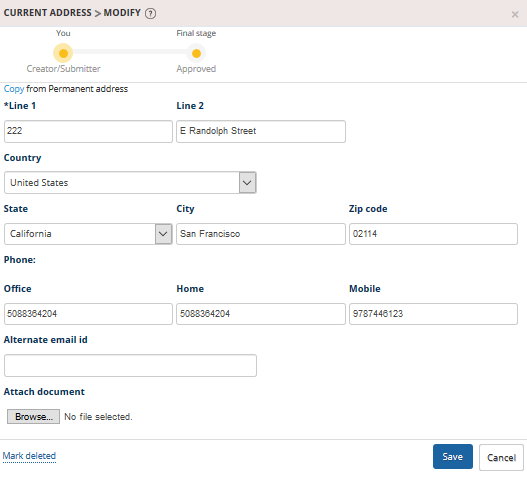
● Provide your house number, street address and area details in the Line 1 and Line 2.
● Select your Country and State from their respective dropdown, and provide City and area pin code in Pin Code fields.
● Provide your alternate email id in Alternate Email id field and telephone numbers of Office and Home in their respective textboxes and mobile number in the Mobile textbox in the Phone field.
● Attach a residence proof document (if any) by clicking the Choose file button of Attach a document field and then click Save.
● The current address details are successfully saved and are sent for approval. A message suggesting the same appears. Similarly, you can modify the permanent address. Click Edit button under Permanent Address section. Modify the details and save changes.
Update Emergency Contact Details
● Click Edit button under In Case of Emergency section.
● The Emergency Contact > Modify page appears.
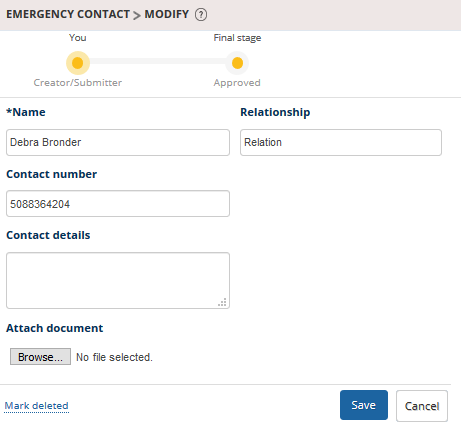
● Provide the Name and Relationship of the emergency contact person in their respective fields.
● Provide the Contact No. and Contact Details in their respective fields.
● Attach a related document in the Attach a document field by clicking Choose file and then selecting the document from your computer.
● Click Save.
The emergency contact details are successfully saved and sent for approval to HR Manager and a message suggesting the same appears.
Related Links
- Employee Basic Details
- Photograph
- Employment Details
- Other Details, Hobbies and Languages known
- Address Details
- Dependent Details
- Beneficiaries
- Confidential IDs
Suggested Links





