 Skip to content
A development plan encourages employees to go beyond their current role and job expectations and develop new skills. Employees fill development plan form to specify key development and training needs.
To fill the Employee Development Plan form, you need to:
● Follow the steps given on Fill Appraisal Form.
● Click Employee Development Plan. The form appears where you can specify the skills that you want to develop and the time frame for their development.

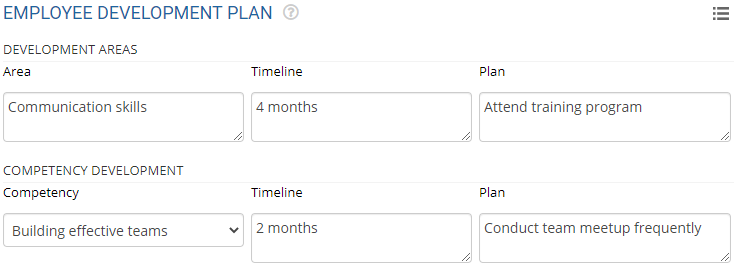
● In the Development Areas section, provide the skills that you want to develop in the Areas field and their descriptions in the corresponding Plan column. Provide the time frame in which you plan to achieve the skill in the Timeline field.
● In the Competency Development section, select the competency that you want to develop in the next review period from the Competency dropdown.
● Provide the description in the Plan field describing your plan to achieve the competency. Fill the Timeline column of the corresponding competency.
● In the Training programs section, specify the training program that you want to undergo during this period in the Program name.
● In the Career plan section, provide the job description that you are looking to accomplish in the Job role field and then mention the estimated time frame by which you want to acquire that job role in the Timeline field. Provide the description of the job role that you have specified in the Development plan section.

● Click Save and the form is successfully saved.
Related Links
Suggested Links
- Setup Performance Appraisal Plans
- Initiate Appraisal
- Change Appraisal State
- Configure Performance Potential Settings
- Appraisal-Employee Access
- Manage Team Appraisal – Filter Records
- Print Appraisal
- Manager Appraisal Dashboard
- Create a new Rating Scale





